- New
![xTool Laser Cutter - M1 Ultra 20W- 4-in-1 Craft Machine - Bundles Available [Free Shipping]](https://dev.marvle3d.co.nz/15715-large_default/xtool-20w-m1-ultra-the-world-s-first-4-in-1-craft-machine.jpg "xTool Laser Cutter - M1 Ultra 20W- 4-in-1 Craft Machine - Bundles Available [Free Shipping]")
![xTool Laser Cutter - M1 Ultra 20W- 4-in-1 Craft Machine - Bundles Available [Free Shipping]](https://dev.marvle3d.co.nz/15715-medium_default/xtool-20w-m1-ultra-the-world-s-first-4-in-1-craft-machine.jpg "xTool Laser Cutter - M1 Ultra 20W- 4-in-1 Craft Machine - Bundles Available [Free Shipping]")
![xTool Laser Cutter - M1 Ultra 20W- 4-in-1 Craft Machine - Bundles Available [Free Shipping]](https://dev.marvle3d.co.nz/11573-medium_default/xtool-20w-m1-ultra-the-world-s-first-4-in-1-craft-machine.jpg "xTool Laser Cutter - M1 Ultra 20W- 4-in-1 Craft Machine - Bundles Available [Free Shipping]")
![xTool Laser Cutter - M1 Ultra 20W- 4-in-1 Craft Machine - Bundles Available [Free Shipping]](https://dev.marvle3d.co.nz/11571-medium_default/xtool-20w-m1-ultra-the-world-s-first-4-in-1-craft-machine.jpg "xTool Laser Cutter - M1 Ultra 20W- 4-in-1 Craft Machine - Bundles Available [Free Shipping]")
![xTool Laser Cutter - M1 Ultra 20W- 4-in-1 Craft Machine - Bundles Available [Free Shipping]](https://dev.marvle3d.co.nz/11572-medium_default/xtool-20w-m1-ultra-the-world-s-first-4-in-1-craft-machine.jpg "xTool Laser Cutter - M1 Ultra 20W- 4-in-1 Craft Machine - Bundles Available [Free Shipping]")
![xTool Laser Cutter - M1 Ultra 20W- 4-in-1 Craft Machine - Bundles Available [Free Shipping]](https://dev.marvle3d.co.nz/11570-medium_default/xtool-20w-m1-ultra-the-world-s-first-4-in-1-craft-machine.jpg "xTool Laser Cutter - M1 Ultra 20W- 4-in-1 Craft Machine - Bundles Available [Free Shipping]")
![xTool Laser Cutter - M1 Ultra 20W- 4-in-1 Craft Machine - Bundles Available [Free Shipping]](https://dev.marvle3d.co.nz/11574-medium_default/xtool-20w-m1-ultra-the-world-s-first-4-in-1-craft-machine.jpg "xTool Laser Cutter - M1 Ultra 20W- 4-in-1 Craft Machine - Bundles Available [Free Shipping]")


228 Bush Road, Rosedale | Mon–Sat 9:30–4:30

Auckland Local Stock
Authorized NZ Distributor – Marvle3D
*xTool Laser Cutter - M1 Ultra 20W- 4-in-1 Craft Machine - Bundles Available [Free Shipping]
-4-in-1 laser cutting, engraving, blade cutting and drawing
-10W laser for precise and efficient crafting
-Inkjet printing support expands creative options
-AI recognition for easy setup and operation
Compatible with: wood, paper, fabric and more
Why Marvle3D?
Marvle3D—New Zealand’s expert since 2016, offering friendly support, in-store demos, and one of the country’s largest ranges.
 Security policy(edit with the Customer Reassurance module)
 Delivery policy(edit with the Customer Reassurance module)
 Return policy(edit with the Customer Reassurance module)
---
Bundle Details — Included Items:
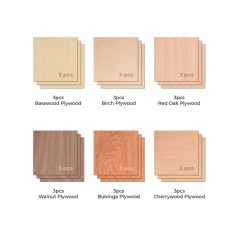
Entry Bundle- M1 Ultra 20W + Materials + Fire Safety Set
Advanced Bundle- M1 Ultra 20W + Materials + Fire Safety Set + Blade Tools*4 + Pens + Inkjet Module
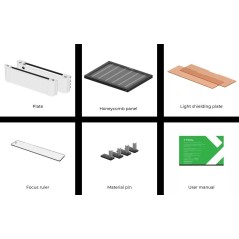
Deluxe Bundle- M1 Ultra 20W + Materials + Fire Safety Set + Blade Tools*4 + Pens + Inkjet Module + Smart Air Assist + Riser Base With Honeycomb + RA2 Pro
All-In-One Bundle- M1 Ultra 20W + Materials + Fire Safety Set + Blade Tools*4 + Pens + Inkjet Module + Smart Air Assist + Riser Base With Honeycomb + RA2 Pro + AP2
SKU:
Smart Air Assist- P5010254
Fire Safety- P5010367
Riser Base With Honeycomb- P5010348
RA2 Pro- P5010279
AP2- P5010394-AU (P5010390-US)
---
| Product Specifications: | Open/ Download PDF |
Introduction to M1 Ultra Machine:
xTool M1 Ultra — The First 4-in-1 Ultimate Craft Machine
The xTool M1 Ultra combines laser cutting, inkjet printing, blade cutting, and pen drawing into a single all-in-one creative machine, delivering unmatched versatility for makers.
Smart Multitasking for Seamless Print-to-Cut Workflow
Effortlessly print and cut in a single integrated process, allowing the machine to switch tasks automatically for faster production, cleaner results, and a smooth, time-saving workflow perfect for high-efficiency crafting.
Versatile Material Support
Create with confidence across multiple surfaces, as the system prints seamlessly on wood, paper, acrylic, canvas, and a wide range of other materials.
Snapshot Preview for Superior Accuracy
Enjoy ultra-precise project alignment with a snapshot preview system that delivers up to 10× higher accuracy than traditional single-camera setups.
Class 1 Certified for Top-Tier Laser Safety and Artimind AI — Design Made Easy in Seconds
Engineered with advanced protection features, the system delivers Class 1 laser safety—the highest standard—ensuring safe operation in homes, studios, and classrooms. With Artimind AI, you can instantly generate ready-to-use designs in just seconds, making creative work faster, simpler, and more effortless than ever.
Transform 1,000+ Materials into Masterpieces
The M1 Ultra handles everything from soft to hard materials and flat sheets to curved 3D surfaces, offering over three times the material compatibility of standard vinyl cutters or single-mode engravers, unlocking endless creative possibilities for every type of project.
| Download/Open the PDF | View All Material list |
Laser Mode High-Power Diode Laser Precision
With a switchable diode laser up to 20W, the system cleanly engraves and cuts a wide range of materials—handling sheets up to around 10 mm thick in a single pass—while its ultra-fine focused laser spot delivers exceptional detail and sharp, accurate results for intricate designs.
Blade Mode Precision Cutting
Blade Mode equips the M1 Ultra with fine-point and cutting blades to handle everything from delicate 1.5 mm paper, vinyl, and stickers to thicker materials up to 2.5 mm like leather, matboard, and balsa wood, while its Pin-point Positioning technology—designed to be far more accurate than single-camera systems—helps maximize material usage and minimize waste even on the most intricate projects.
Inkjet Module (Add-On)
The optional inkjet module expands creative possibilities by enabling vivid, full-color printing on a wide range of materials—including wood, clay, coated stone, and fabric—using CMY ink technology to deliver rich, vibrant colors that make every design stand out.
Pen Mode
Pen Mode supports a wide range of third-party pens, such as Cricut-compatible options, enabling precise drawing, smooth writing, and flexible creative expression, with open-lid operation available to accommodate longer pens during pen-only use.
Smart Combos, Simple Success
Switch between processes in just three seconds with the Easy Swap™ design, eliminating the need for multiple devices and delivering fast, efficient, and precise results every time.
Innovative Electrostatic Mat for Curl-Free Papercraft
Enhance your crafting with the Electrostatic Mat, designed to keep paper perfectly flat while preventing curling and tearing. Enjoy effortless, eco-friendly crafting with zero waste and no sticky residue left behind.
Craft with Confidence, Easy for All
Designed with your experience in mind, this machine delivers powerful multifunction performance while staying remarkably simple to use—making it effortless for anyone, beginner or expert, to unlock their creative potential.

Frequently asked questions:
Note: All answers are copied from xTool Office website. They are from xTool point of view.
1. Q: What is the difference between M1 Ultra and S1?
1. A: Both the xTool M1 Ultra and S1 are Class 1 safety machines designed with robust expandability. Both are compatible with the RA2 Pro for rotary projects and support laser screen printing, offering even more creative potential. Choose the M1 Ultra if you love DIY crafting and want a versatile machine that saves space, boosts efficiency, and handles a wide variety of creative tasks and materials. Choose the S1 if you’re focused on laser engraving and cutting, need a larger workspace for bigger projects, and require efficient batch processing. The S1 is a laser engraver with versatile power options, including 10W, 20W, and 40W (for thicker cutting), as well as 2W IR (for all metal engraving). On the other hand, the M1 Ultra is a 4-in-1 multifunctional craft machine that combines Laser (10W and 20W), Inkjet, Blade, and Pen modules for even more creative possibilities.The S1 offers a larger working area of 19.6" x 13" (498mm x 330mm), which can be extended up to 118 inches with an optional conveyor accessory, providing more space than the M1 Ultra’s 11.81" x 11.81" (300mm x 300mm). The S1 also operates at a higher speed, reaching up to 600mm/s, compared to the M1 Ultra’s 400mm/s. This makes the S1 ideal for creating large door signs or managing high-efficiency batch production. However, with its 4-in-1 design, the M1 Ultra offers features that the S1 lacks, such as inkjet printing, fine-point cutting, deep cutting, rotary cutting, foiling, debossing, and drawing & writing. It can process over 1,000 materials—three times more than a single laser module (such as vinyl, which cannot be processed with lasers)—and even pairs with the xTool H1 for heat-press projects, delivering exceptional versatility for crafting.
2. Q: What materials can M1 Ultra support?
2. A: The M1 Ultra has 4 modes and 9 processing methods, supporting over 1,000 materials. Laser Mode: Wood, leather, MDF, coated acrylic, electroplated metal, painted metal, coated glass, ceramic, marble, and more. Blade Mode: Vinyl (for blade mode only), paper, leather, felt, fabrics, and more. Inkjet Mode: Wood, coated acrylic, canvas, fabrics, printing paper, and more. Pen Mode: Paper, ceramic, and more.
3. Q: What materials can the inkjet module print?
3. A: It can print on fabrics, boards, printing paper, and other materials. However, it cannot print on very dense or smooth surfaces, such as metal, glass, and ceramics, because the ink cannot penetrate or adhere. These materials can be processed after applying a suitable ink coating.
4. Q: How can I customize a T-shirt with M1 Ultra?
4. A: You can choose either the xTool Screen Printer or the xTool Heat Press to customize a T-shirt. xTool Screen Printer: Use the M1 Ultra’s laser mode to engrave the screen template, then transfer ink to the T-shirt. Ideal for creating colorful art and simple designs. xTool Heat Press: Use the M1 Ultra’s blade mode to cut vinyl into patterns, then transfer the design to the T-shirt using heat and pressure. Suitable for HTV, sublimation, and DTF transfers, and can handle more intricate patterns.
5. Q: How can I customize a tumbler with M1 Ultra?
5. A: You can usethe RA2 Proto customize a tumbler. If your object is taller than 27 mm(1.06"), the Riser Base will help.
6. Q: Are the Air Assist and Air Purifier necessary accessories?
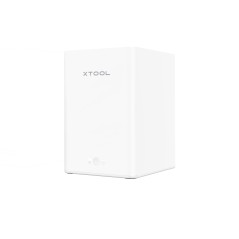
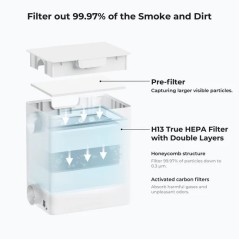
6. A: If you frequently use laser mode, choosing an Air Assist or Air Purifier will enhance your laser experience. Air Assist: Helps clear dust during high-power cutting for cleaner edges and finishes. SafetyPro™ AP2 Air Purifier: Ideal for indoor use, efficiently purifying the air and removing odors.
7. Q: How can I learn about using M1 Ultra?
7. A: 15+ Courses: After your order starts shipping, the 15+ courses will be sent to your email on the fourth day. You can check your order status in My Account. Join Our Community: Join our Facebook community to connect with other crafters and share ideas. Youtube Tutorials: Over 35+ M1 Ultra tutorial videos are available, and we will continue to update them.
Specific References
No customer reviews for the moment.
![xTool Laser Cutter - M1 Ultra 20W- 4-in-1 Craft Machine - Bundles Available [Free Shipping]](https://dev.marvle3d.co.nz/11569-large_default/xtool-20w-m1-ultra-the-world-s-first-4-in-1-craft-machine.jpg "xTool Laser Cutter - M1 Ultra 20W- 4-in-1 Craft Machine - Bundles Available [Free Shipping]")
Auckland Local Stock
Authorized NZ Distributor – Marvle3D
*xTool Laser Cutter - M1 Ultra 20W- 4-in-1 Craft Machine - Bundles Available [Free Shipping]
-4-in-1 laser cutting, engraving, blade cutting and drawing
-10W laser for precise and efficient crafting
-Inkjet printing support expands creative options
-AI recognition for easy setup and operation
Compatible with: wood, paper, fabric and more
Why Marvle3D?
Marvle3D—New Zealand’s expert since 2016, offering friendly support, in-store demos, and one of the country’s largest ranges.